🔒 100% Privacy-First Design
Video Clipper processes everything locally in your browser. No data is ever transmitted to external servers - your recordings never leave your device.
⚠️ Alpha Release
Video Clipper is currently in alpha - this entire application was built in a single afternoon using AI assistance as a proof-of-concept. While fully functional, you may encounter bugs or unexpected behavior.
I'd love your feedback! If you find issues or have suggestions for improvements, please let me know. This rapid development approach allows for quick iteration based on real user needs.
I've just launched Video Clipper, a comprehensive screen recording tool that runs entirely in your browser, combining powerful recording capabilities with sophisticated video editing features. Unlike tools like Loom, this is completely free, requires no user signup, and your data stays local on your device.
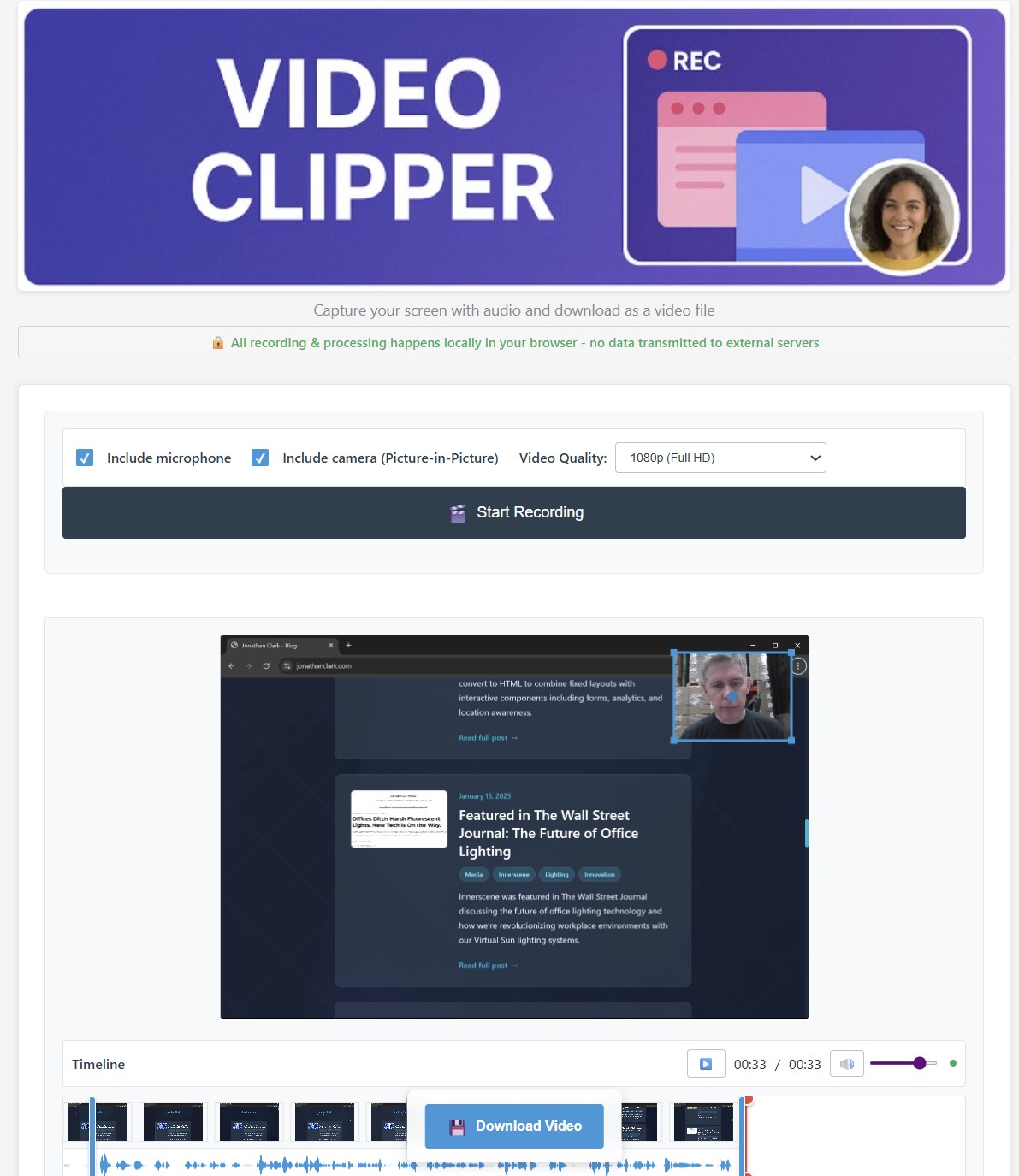
Video Clipper's clean, intuitive interface - everything you need for professional screen recording
Why Video Clipper?
While there are many screen recording solutions available, most suffer from significant privacy concerns, require software installation, or lack comprehensive editing capabilities. I wanted to create something different:
- Zero Data Transmission - Everything happens locally in your browser
- No Installation Required - Works in any modern browser
- Comprehensive Editing - Built-in video editor with timeline, cropping, and trimming
- Multiple Quality Options - From 480p to full native resolution
- Microphone Audio - High-quality microphone recording support
Key Features
Advanced Screen Capture
Record your entire screen, specific application windows, or browser tabs with optional microphone audio. The tool supports multiple quality settings from 480p up to your display's native resolution.
Picture-in-Picture Webcam
Optional webcam recording with a draggable, resizable overlay that you can position anywhere on your recording. Perfect for tutorial videos or presentations where you want to include yourself.
Professional Video Editor
After recording, dive into a full-featured editor with:
- Visual timeline with thumbnail previews
- Audio waveform visualization
- Precise trimming with drag handles
- Interactive cropping with 8-point control system
- Real-time preview of all edits
See Video Clipper in Action
Here's an example recording created with Video Clipper, showing the kind of high-quality output you can expect:
Example recording created with Video Clipper - demonstrating the quality and editing capabilities
The Privacy Advantage
In an era where data privacy is increasingly important, this tool takes a radical approach: your data never leaves your device. Here's what that means:
- No cloud processing or storage
- No account registration required
- No data collection of any kind
- Works completely offline after initial load
Technical Implementation
The application leverages modern web APIs to deliver desktop-class functionality:
Screen Capture API
Uses the native getDisplayMedia() API for high-quality screen recording with minimal performance impact, focusing on excellent video capture quality.
MediaRecorder API
Handles the actual recording process, supporting multiple codecs (WebM with VP9/VP8, or MP4 with H.264) depending on browser capabilities. Configurable bitrates ensure optimal file size vs. quality balance.
Web Audio API
Enables high-quality microphone audio capture with real-time processing for professional-quality recordings.
Canvas-Based Video Processing
The video editor uses HTML5 Canvas for frame-by-frame processing, enabling features like cropping and timeline scrubbing without requiring server-side processing.
Browser Compatibility
Video Clipper has been tested and confirmed to work with:
- ✅ Chrome 72+ (fully tested and recommended)
The application should work in other modern browsers that support the Screen Capture API, but these haven't been fully tested yet:
- 🔄 Firefox 66+ (untested)
- 🔄 Edge 79+ (untested)
- 🔄 Safari 13+ (untested)
Use Cases
This tool is perfect for:
- Software Tutorials - Record your screen while explaining features
- Bug Reports - Capture issues for development teams
- Presentations - Record talks or demos for later sharing
- Online Courses - Create educational content with PiP webcam
- Product Demos - Showcase software features to clients
- Meeting Records - Capture important discussions (with permission)
The Architecture
The application is built with a modular JavaScript architecture:
- screen-recorder.js (38KB) - Core recording functionality
- video-editor.js (105KB) - Comprehensive editing features
- main.js (5KB) - Application initialization and utilities
This separation allows for efficient loading and maintenance while keeping the codebase organized and extensible.
Built with AI in One Afternoon
Perhaps the most remarkable aspect of Video Clipper is how quickly it came together. The entire application—from initial concept to this alpha release with screen recording and video editing capabilities—was built in a single afternoon using AI assistance.
This rapid development approach means Video Clipper is currently in alpha status. While fully functional for its core features, there may be edge cases, browser-specific quirks, or UI polish items that need refinement. This demonstrates both the incredible potential and current limitations of AI-powered development.
What traditionally might have taken weeks of research, development, and testing was accomplished in a single session. This isn't just about writing code faster—it's about leveraging AI to understand complex APIs, implement best practices, and create genuinely useful software at unprecedented speed.
The alpha status reflects this rapid development timeline. User feedback is invaluable for identifying issues and prioritizing improvements for future releases.
The Power of Modern Web APIs
Video Clipper's capabilities are made possible by a collection of cutting-edge web APIs that have transformed what's achievable in browsers. Understanding these APIs reveals why this level of functionality can now be delivered without any software installation.
Screen Capture API (getDisplayMedia)
The foundation of Video Clipper is the getDisplayMedia() API, which provides direct access to screen content. This relatively new API (standardized in 2018) allows web applications to:
- Capture entire screens - Access to the full desktop environment
- Record specific windows - Target individual applications without background interference
- Capture browser tabs - Perfect for creating web-based tutorials and demos
- Handle multi-monitor setups - Users can choose which display to record
What makes this API particularly powerful is its security model. Rather than requiring dangerous system-level permissions, it presents users with a native browser dialog to choose exactly what they want to share. This provides both security and user control.
MediaRecorder API - Real-time Encoding
The MediaRecorder API handles the complex task of encoding video streams in real-time. This API:
- Streams directly to memory - No temporary files or disk I/O required
- Supports multiple codecs - VP8, VP9, H.264 depending on browser capabilities
- Handles variable bitrates - Automatically adjusts quality based on content complexity
- Manages audio synchronization - Keeps video and audio perfectly aligned
Canvas API - Frame-by-Frame Processing
Video Clipper's editing capabilities rely heavily on the HTML5 Canvas API for video manipulation:
- Frame extraction - Pulls individual frames from video for timeline thumbnails
- Real-time cropping - Applies crop rectangles during playback preview
- Image processing - Handles scaling, rotation, and pixel manipulation
- Export rendering - Combines edited frames into final output
Web Audio API - Professional Audio Processing
For microphone audio capture and processing, Video Clipper leverages the Web Audio API:
- Low-latency audio capture - Direct access to microphone streams
- Real-time monitoring - Audio waveform visualization during recording
- Format conversion - Handles different audio codecs and sample rates
- Level control - Automatic gain control and noise suppression
File System Access - Seamless Downloads
The modern File System Access API enables Video Clipper to save recordings directly to user-chosen locations:
- Native save dialogs - Uses the operating system's file picker
- Large file handling - Efficiently streams large video files to disk
- Format preservation - Maintains original video quality and metadata
Why This Matters
These APIs represent a fundamental shift in web capabilities. Previously, screen recording required:
- Native desktop applications with system permissions
- Complex installation processes and security warnings
- Platform-specific code for Windows, Mac, and Linux
- Regular updates and compatibility maintenance
Now, a single web application can deliver the same functionality across all platforms, with automatic updates and zero installation friction. This democratizes access to professional tools and represents the future of software distribution.
Try It Yourself
Video Clipper is available now at /video_clipper. No account needed, no installation required—just open the link and start recording.
Whether you're creating tutorials, documenting bugs, or recording presentations, this tool provides professional-grade capabilities while keeping your data completely private. In a world where privacy is increasingly rare, it's refreshing to use tools that respect your data sovereignty.
Start Recording Today
Experience privacy-first screen recording with professional editing features
Launch Video ClipperHave feedback or feature requests? I'd love to hear from you. This tool represents my commitment to building privacy-respecting applications that put users first.